Showing posts with label FFT. Show all posts

Sunday, 3 January 2010

Limit Cycle EP - Out now on Fools Forest!

Limit Cycle EP, containing the tracks Limit Cycle, Ax34 Suimle, Tryastvec Pattern and Mosaic, has just been released by Fools Forest! This EP basically started out with me getting into the Max4Live beta, spawning the track Ax34 Suimle. When Fabian at Fools Forest heard it, he said he wanted to release it and I said go ahead. Limit Cycle followed Ax34 Suimle and then Tryastvec Pattern. At that point there were going to be just those three tracks but before Fabian had the time to finish up the cover artwork I finished Mosaic.

These four tracks are in a sense experiments: They are all made using possibilities open up by Max4Live, the extension to Ableton's Live sequencing software, which allows for easier control over things such as algorithmic composition. And this EP is filled of just that. Variations on the concept spawned by Per Nørgaard's Infinity Series are restrained by mutating scale quantizers while psuedo-random pattern and weighted random generators create constantly moving rythmic material. These numbers comes to life via synthesizers in which all sound parameters are slightly, slowly moving, creating an organic texture of sounds. These tracks could have been created before Max4Live of course, but I can only imagine having to spend at least 6 months on every track, working out these tremendously complex mathematical relations between the notes by hand, in a traditional sequencing enviroment.

With this, I would also like to say that Max4Live is quite possibly, in my opinion, the greatest innovation within music technology in the 00's!

I hope you'll enjoy listening to it as much as I did making it!


Download via Bandcamp Multiple Formats

Tuesday, 12 May 2009

Iterations - Quadraphonic piece premieres friday 15/05/09

Sorry for the short notice, I've been REALLY busy, no time to update my blog.
On friday my quadraphonic piece iterations will be played to the public on the "Ljudvågor" festival in Visby. It's a piece which I've been working for ever since I moved to here. What makes me proud of it is that I've managed to combine all my old techniques with new found ones and done things I've always wanted to try out, all in 6:42.

Just a small list of things I'm using: My modular (AFG, Z3000, A-106-1, A-106-6, A-132-3, A-143-1, A-189-1 and A-196), Reaktor (custom patches), Max/MSP (for algorithmic stuff), DtBlkFx, Ableton Live, Logic Studio (surround mixing, panning, quadraphonic reverbs etc)

I will try to find some proper medium to get it online somehow, for you to burn onto dvd-audio discs or whatever, in 5.1. Also it might be available in stereo on my upcoming release in june... =P

Ticket booking

Friday, 7 November 2008

Analogue vs Digital

So, for fun I wanted to do something with my currently extremely limited modular: I patched 2 ADSR's from my A-143-2 into self-trigger mode, with their speeds set to high. This creates two oscillators with a waveform which goes from saw-wave, to triangle and into ramp. Then I ran them into my passive ring-mod. The output was recorded while I tweaked away at it.

Then I decided to go crazy, I put the soundfile into a track in Ableton Live and set the sample's playback setting to complex, I recorded tempo-changes to create fft'y time-stretches where needed. Next up was dtblk, binding settings to a midi-controller, made automating it a really good time. The end result was bounced to a new file, as I wanted a fresh start.

Next up was loads of filtering, using PSP Nitro, Oligaric, Arcdev Cyclotron and much more. This was done in parallell, in order to create more movement in the sound.

Veqtor-AnalogVsDigitaltest.mp3

If you're wondering how I get it to integrate well with the modular sound, then I can give you some pointers.

1. Always work in 96 Khz and 24 or more bits, to avoid aliasing at all times, especially when working with recorded modular material! Then when all processing is finished, you can use some nice resampler, like the one by izotope which is available inside Audiofile Engineering's Wave Editor, for mac users, Adobe Audition's resampler isn't too bad either. Doing it this way will create a highly vivid result.

2. Automate

3. Automate

4. Automate, I really can't stress this enough, without movement, even if it's hard to hear it, effects and such which are static is what a lot of people associate with a digital sound.

5. Use your DAW and plugins to do things which aren't possible in the analogue world (why try to make your computer something it's not?), ideally, use a modular software, such as Plogue Bidule as a modular effect to control these plugins. Plogue Bidule can be utilized with multiple inputs and outputs to create extremely complex routings.

6. NEVER, and I mean NEVER, synthesize a waveform on a computer unless it's meant to have digital characteristics, a highly trained ear simply tells it from an analogue one instantly, unless it's a painstakingly accurate emulation, like d16-group's phoscyon, but it is the only example of an analogue emulation that has actually tricked one of my friends ;-)

Monday, 6 October 2008

Plogue Bidule + DtBlkFx = Fun


Something I've been working on, using plogue bidule to turn dtblkfx into a FSU-device (like glitch but with fft fx)
Example, featuring livecut:

Plogue+DtBlkFx

Thursday, 2 October 2008

DtBlkFx is awesome and free!


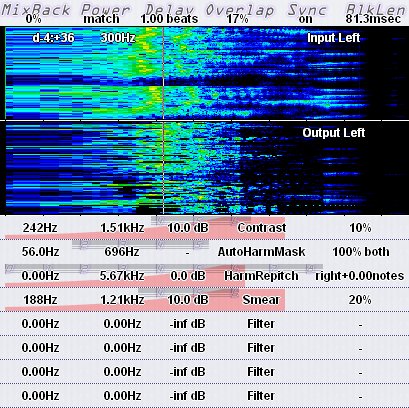
Do you sometimes discover an awesome thing that's been around for ages but you for some reason haven't encountered it despite how cool it is? DtBlkFx was one of those things for me. My flatmate showed it to me the other day and I've been hooked ever since!

It's an FFT-multi-effect for Win and Mac and has a couple of different transformations you can perform on the FFT'ed material, but what really opens up some new oportunities is the masking, which lets you for example select all the even harmonics and perform the transformations on it instead of on everything.

Official Site and Download

And here's a little thing I made using a couple of instances of it, and some BO, with a lot of Random, tempo-synchronized LFO's controlling almost everything there is in both effects...

edit: try opening it in audition's spectral view:


Veqtor-DtBlkFx_Glitch_Demo